飞书机器人突然不回复了?90% 是这个原因(gateway 排障实录)
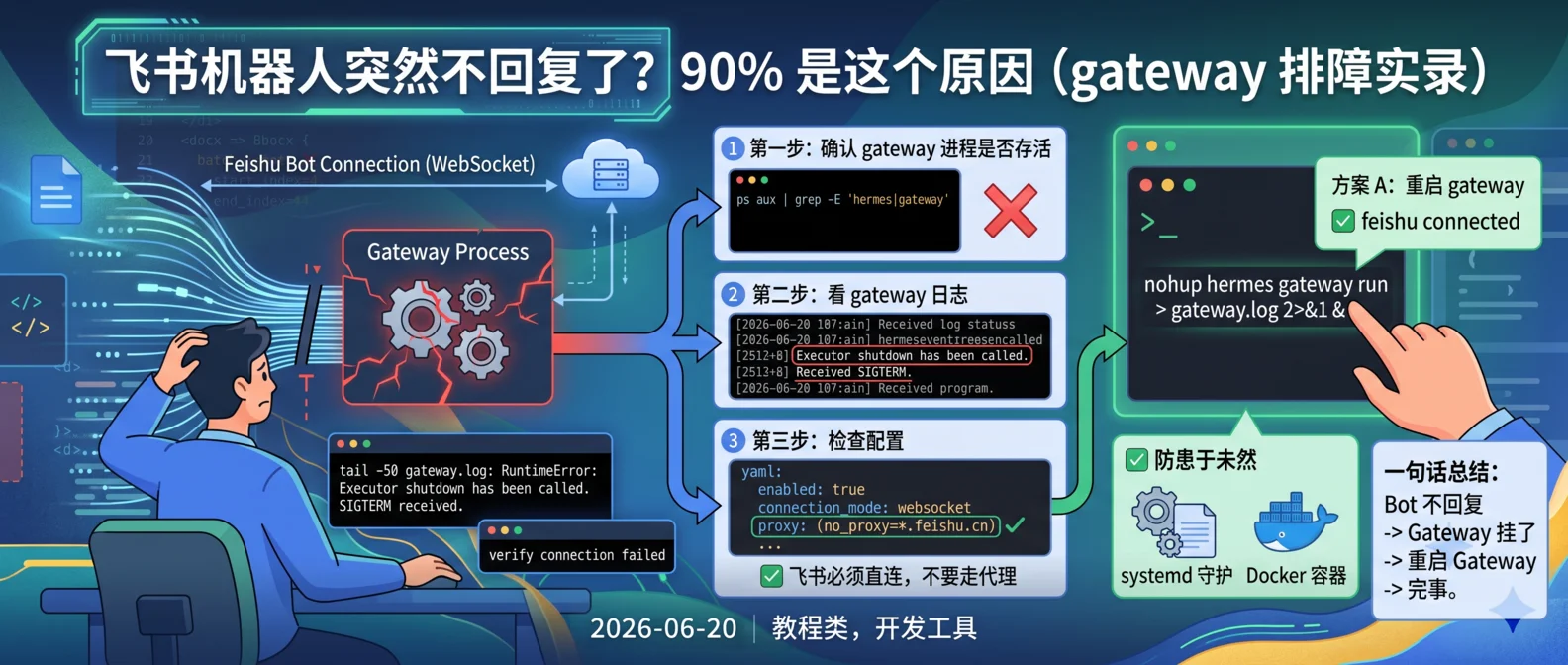
飞书 Bot 跑得好好的,某次系统更新 / 容器重启后突然不回复了?开放平台”验证连接状态”还显示失败?别急着怀疑飞书平台,90% 是本地 gateway 进程挂了。本文记录完整的诊断和恢复流程。
现象
- 给 bot 发消息,没任何回复
- 飞书开放平台”验证连接状态”按钮变红、显示失败
- 日志里出现
RuntimeError: Executor shutdown has been called
根因(一句话说清)
飞书 Bot 通常是用 WebSocket 长连接保持在线的(不用 webhook 回调,免公网 IP)。这个长连接进程一般叫 gateway。
当 gateway 进程被 SIGTERM 杀掉后,asyncio 的线程池 executor 进入关闭状态。这时候即使 WebSocket 重连成功、消息也收到了,回复消息时调用线程池的代码会直接抛 Executor shutdown,导致消息发不出去。
表现就是:
- 飞书后台显示”连接异常”或”验证失败”
- 实际 bot 能收到消息,但发不出去
- 用户以为 bot 死了
完整诊断步骤
第一步:确认 gateway 进程是否存活
1 | ps aux | grep -E 'hermes|gateway' | grep -v grep |
怎么看:
- 看到
hermes gateway run进程 → gateway 还活着,问题不在这里 - 只看到
hermes chat之类的 CLI 进程,没有 gateway → gateway 已挂,继续下一步
第二步:看 gateway 日志
1 | tail -50 ~/.hermes/logs/gateway.log |
关键日志模式:
| 日志 | 含义 |
|---|---|
Executor shutdown has been called |
executor 崩了,消息发不出 |
Received SIGTERM — initiating shutdown |
gateway 被信号杀掉了 |
✓ feishu connected |
飞书 WebSocket 连接正常 |
| 最后一行是 shutdown,没有新启动记录 | gateway 已停 |
第三步:检查配置(仅在 gateway 正常仍不回复时)
1 | cat ~/.hermes/config.yaml | grep -A 10 feishu |
确认几件事:
enabled: trueconnection_mode: websocket- 没有
proxy:配置(飞书必须直连,代理会破坏 WebSocket) app_id和app_secret正确
解法
方案 A:重启 gateway(90% 的情况用这个)
1 | # 后台启动 |
看到这两行就是启动成功:
1 | ✓ feishu connected |
然后去飞书给 bot 发条消息测试。
方案 B:gateway 反复崩溃
检查是否有多个 gateway 进程冲突:
1 | ps aux | grep 'hermes gateway' | grep -v grep |
如果有多个,全杀掉再重启:
1 | pkill -f 'hermes gateway' |
方案 C:一键恢复命令
1 | # 杀掉残留进程 + 重启 + 验证 |
几个常见误区
1. “验证连接状态”按钮失败 ≠ 真的失败
飞书开放平台的”验证连接状态”按钮,点失败不用慌。这是因为一些 SDK 库(比如 lark-oapi)实现细节问题,对平台侧的 PONG 探测不回复,属于设计如此。
判断真正状态的标准:看 gateway 日志有没有 ✓ feishu connected,加上实际发条消息看 bot 能不能回复。
2. 飞书必须直连,不要走代理
.feishu.cn 和 .larksuite.com 域名不要配代理。代理引入的额外握手延迟会破坏 WebSocket 长连接。
如果你用了全局代理(如 Xray、Clash):
- 环境变量加
no_proxy=*.feishu.cn,*.larksuite.com - 或在 config.yaml 的 feishu 配置段明确不要 proxy
3. 别反复重启 hermes chat
hermes chat 是 CLI 客户端(你用来跟 AI 聊天的命令行界面),不是后台服务。重启它对飞书连接毫无帮助。
真正管飞书连接的是 hermes gateway。
4. 怀疑飞书平台前先自查
飞书服务端极少出问题。99% 的情况是本地 gateway 进程或 executor 状态异常。先按上面流程自查,确认本地没问题再去提工单。
防患于未然:如何避免 gateway 反复挂
1. 用 systemd 守护(推荐)
如果你在 Linux VPS 上跑:
1 | # /etc/systemd/system/hermes-gateway.service |
1 | systemctl daemon-reload |
这样 gateway 挂了 systemd 会自动拉起,不用人工干预。
2. 用 Docker 跑(更隔离)
1 | # docker-compose.yml |
restart: unless-stopped + Docker 自带的日志轮转,比裸跑稳得多。
3. 加监控和告警
1 | # 每 5 分钟检查一次 gateway 是否存活 |
或者用更高级的:写一个 watchdog 脚本,gateway 挂了自动重启 + 飞书消息通知你。
一句话总结
飞书 bot 不回复 → 先看 gateway 日志 → 有 Executor shutdown 或进程不在 → 重启 gateway → 完事。
如果你也踩过这个坑,或者有更高级的排查思路,评论区聊聊~