![封面图]()
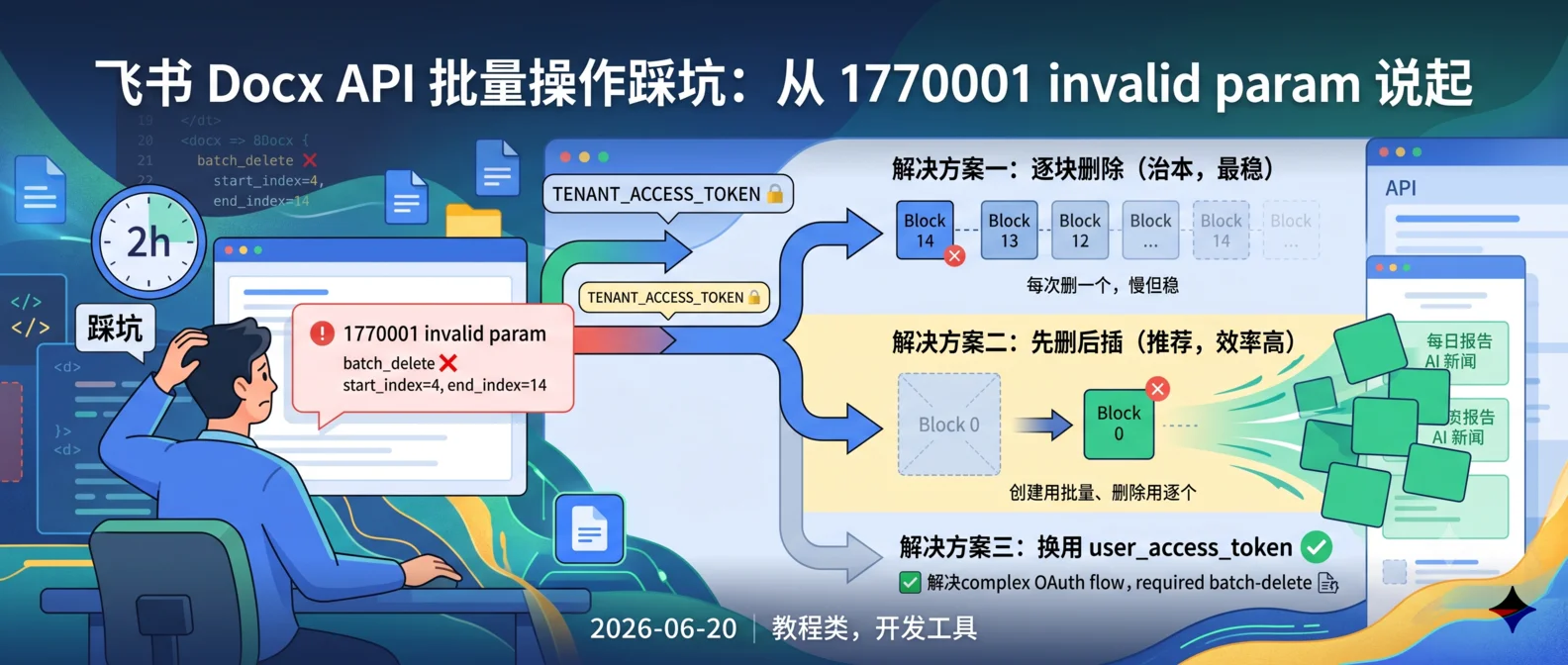
想用飞书开放平台 API 批量编辑文档(删除、更新 Blocks)?你会发现 tenant_access_token 下批量删除大块内容直接报 invalid param (1770001)。本文记录我踩过的坑和真实可用的解法。
起因:为什么要批量编辑飞书文档
我做一个内容自动化项目,需要把外部数据(日报、监控结果)写入飞书文档。理想流程:
- 拉取最新数据
- 清空文档旧内容
- 写入新内容
听起来很简单对吧?但飞书 Docx API 在批量操作上有奇怪的限制,文档上没写明,我花了 2 小时才搞清。
现象:哪些能跑通,哪些不行
我用 tenant_access_token(应用身份)调用飞书 Docx API 测试了一通:
| 操作 |
API |
结果 |
| 创建 Block |
POST .../blocks/{parent_id}/children |
✅ 成功 |
| 删除单个 Block |
DELETE .../batch_delete 传 start_index=N, end_index=N+1 |
✅ 成功 |
| 批量删除多个 Block |
DELETE .../batch_delete 传 start_index=4, end_index=14 |
❌ 报 invalid param (1770001) |
| 更新 Block |
PATCH .../blocks/{block_id} |
❌ 报 invalid param |
规律:单个操作能跑通,批量操作直接拒绝。
根因猜测
文档上没明说,我推测是:
tenant_access_token 是应用级身份,权限受限- 批量删除 / 更新涉及”破坏性操作 + 多 block 影响范围”,平台对应用身份做了风控
- 想做复杂编辑,可能要用 user_access_token(用户身份)
但获取 user_access_token 需要 OAuth 流程,比较麻烦。我先尝试在 tenant_access_token 下找别的出路。
解决方案一:逐块删除(治本,最稳)
思路:每次只删一个 block,从后往前删(避免索引变化),删完一个再删下一个。
1
2
3
4
5
6
7
8
9
10
11
12
13
14
15
16
17
18
19
20
21
22
23
| import requests
def delete_blocks_one_by_one(doc_token, parent_id, headers, start, end):
"""从 end 往 start 倒序删除"""
current_end = end
while current_end > start:
rev_resp = requests.get(
f"https://open.feishu.cn/open-apis/docx/v1/documents/{doc_token}",
headers=headers
)
rev = rev_resp.json()["data"]["document"]["revision_id"]
del_resp = requests.delete(
f"https://open.feishu.cn/open-apis/docx/v1/documents/{doc_token}/blocks/{parent_id}/children/batch_delete",
params={"document_revision_id": rev},
json={"start_index": current_end - 1, "end_index": current_end},
headers=headers
)
if del_resp.json().get("code") != 0:
raise Exception(f"删除失败: {del_resp.json()}")
current_end -= 1
|
缺点:删除 N 个 block 要发 N 次请求,慢。但稳。
解决方案二:先删后插(推荐,效率高)
思路:用最简单的”删除一个 + 批量创建”组合,避开”批量删除”的限制。
1
2
3
4
5
6
7
8
9
10
11
12
13
14
15
16
17
| def replace_content(doc_token, parent_id, new_content_blocks, headers):
"""用新内容替换文档内容"""
rev = get_revision(doc_token, headers)
requests.delete(
f"https://open.feishu.cn/open-apis/docx/v1/documents/{doc_token}/blocks/{parent_id}/children/batch_delete",
params={"document_revision_id": rev},
json={"start_index": 1, "end_index": 2},
headers=headers
)
requests.post(
f"https://open.feishu.cn/open-apis/docx/v1/documents/{doc_token}/blocks/{parent_id}/children",
json={"children": new_content_blocks},
headers=headers
)
|
关键发现:POST 创建 Block 是支持批量的,单次最多创建多个 children。所以**”创建”用批量、”删除”用逐个**是最佳组合。
解决方案三:换用 user_access_token
如果一定要批量删除,得拿到 user_access_token:
1
2
3
4
5
6
7
8
9
10
11
12
13
14
15
16
17
18
19
20
|
auth_url = (
"https://open.feishu.cn/open-apis/authen/v2/index?"
"app_id=YOUR_APP_ID&"
"redirect_uri=YOUR_REDIRECT&"
"scope=docx:document:write_only"
)
resp = requests.post(
"https://open.feishu.cn/open-apis/authen/v2/oauth/token",
json={
"grant_type": "authorization_code",
"code": code_from_callback,
"client_id": "YOUR_APP_ID",
"client_secret": "YOUR_APP_SECRET"
}
)
user_access_token = resp.json()["access_token"]
|
适用场景:
- 你做的是用户级产品(用户授权后代表自己操作)
- 不适合纯后台自动化场景(拿不到用户授权)
实用的代码片段(生产可用)
下面是我项目里跑通的版本——把”清空文档 + 写入日报内容”封装成一个函数:
1
2
3
4
5
6
7
8
9
10
11
12
13
14
15
16
17
18
19
20
21
22
23
24
25
26
27
28
29
30
31
32
33
34
35
36
37
38
39
40
41
42
43
44
45
46
47
48
49
50
51
52
53
54
55
56
57
58
59
60
61
| import requests
import json
FEISHU_BASE = "https://open.feishu.cn/open-apis/docx/v1"
def clear_and_write_doc(doc_token, parent_id, tenant_token, new_blocks):
"""清空飞书文档指定区域并写入新内容"""
headers = {
"Authorization": f"Bearer {tenant_token}",
"Content-Type": "application/json"
}
doc_resp = requests.get(
f"{FEISHU_BASE}/documents/{doc_token}",
headers=headers
).json()
rev = doc_resp["data"]["document"]["revision_id"]
block_count = len(doc_resp["data"]["document"]["blocks"])
if block_count > 1:
for i in range(block_count - 1, 0, -1):
rev = requests.get(
f"{FEISHU_BASE}/documents/{doc_token}",
headers=headers
).json()["data"]["document"]["revision_id"]
del_resp = requests.delete(
f"{FEISHU_BASE}/documents/{doc_token}/blocks/{parent_id}/children/batch_delete",
params={"document_revision_id": rev},
json={"start_index": i, "end_index": i + 1},
headers=headers
).json()
if del_resp.get("code") != 0:
print(f"删除第 {i} 个 block 失败: {del_resp}")
break
create_resp = requests.post(
f"{FEISHU_BASE}/documents/{doc_token}/blocks/{parent_id}/children",
headers=headers,
json={"children": new_blocks}
).json()
return create_resp
new_blocks = [
{"block_type": 2, "text": {"elements": [{"text_run": {"content": "今日日报"}}]}},
{"block_type": 2, "text": {"elements": [{"text_run": {"content": "AI 行业有 3 条重要新闻..."}}]}},
]
result = clear_and_write_doc(
doc_token="你的文档ID",
parent_id="父 block ID",
tenant_token="应用的 tenant_access_token",
new_blocks=new_blocks
)
print(result)
|
其他可能踩的坑
1. document_revision_id 必须用最新的
飞书文档每次修改后 revision_id 会变。如果删一个 block 用老的 revision_id,会报”revision 不匹配”。正确做法:每次操作前先 GET 一次拿最新 revision。
2. 索引会动态变化
你删除第 5 个 block 后,原本索引 6 的内容会变成索引 5。所以逐个删除必须从后往前。
3. 文档有占位 block
新建的飞书文档至少有一个 block(往往是占位段落),删除时别把整个文档删空,否则后续插入可能找不到 parent。
4. Wiki 文档 vs 普通 Docx 文档
如果你操作的是 Wiki 节点下的文档(/wiki/...),它的 API 路径前缀是 /wiki/v2,不是 /docx/v1。这是另一个 API 体系,权限模型也不同。
写在最后
飞书 Docx API 的限制比想象的多,文档没明示,官方论坛也很少有人讨论。这里总结几点:
- 小批量操作(< 5 个 block):用 tenant_access_token 配合”逐个删除 + 批量创建”组合
- 大批量操作:老老实实拿 user_access_token
- 避免动态索引问题:从后往前删,每次操作前 GET 最新 revision
- 生产环境:加 try-catch 和重试,飞书 API 偶尔会有 500 错误
如果你也在做飞书自动化,评论区交流一下你踩过的坑~
关联阅读:飞书机器人开发踩坑实录:权限配置、群聊互@和那些我绕过的弯路