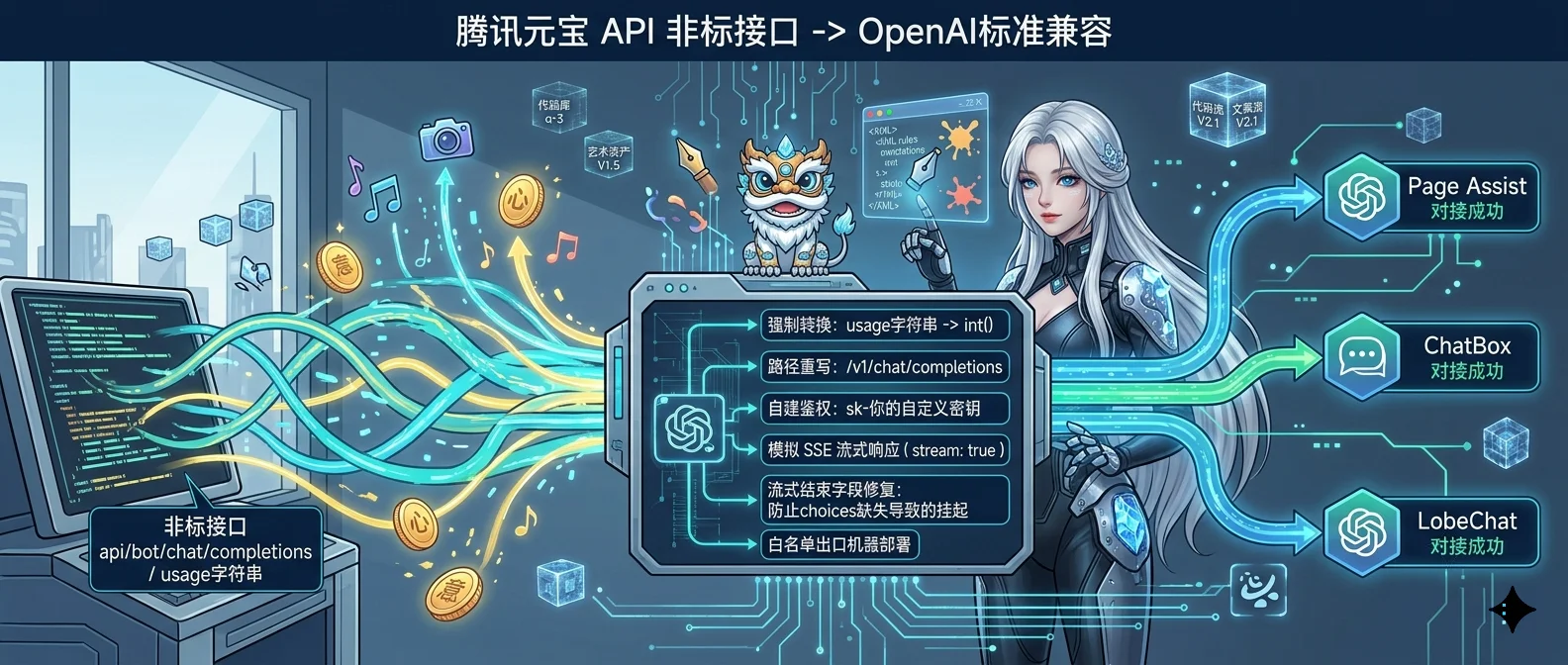
元宝的 API 又有 IP 白名单限制,路径也不是 OpenAI 标准的 /v1/chat/completions。这篇记录如何用一个 100 行的 Python 代理,把元宝包装成标准 OpenAI 兼容接口。
为什么要折腾这个 国内大厂的 AI 大模型 API,基本上都有几个共同特点:
IP 白名单 :只能在特定出口 IP 调用路径自定义 :不是 /v1/chat/completions,而是 /api/bot/chat/completions 之类Token 字段奇怪 :数字返回字符串、流式挂起等
这些设计对厂商自有产品友好,但如果你想拿来做实验、接第三方客户端(比如 Page Assist、ChatBox、LobeChat),基本都会踩坑。
我最近用腾讯元宝 做了一轮穿透,踩了不少雷,记录一下完整方案。
第一步:摸清厂商 API 的实际行为 先把厂商的原始 API 摸清楚,不能靠猜。
元宝的 API 特征:
维度
元宝实际
路径
/api/bot/chat/completions
鉴权 Header
Authorization: Bearer <API_KEY>
必填 Header
X-Model-Id: <模型标识>
模型标识
openclaw_yuanbao_robot_model
IP 白名单
仅龙虾主机出口
Token 返回类型
字符串 (如 "42")
最后这个 Token 返回类型是个大坑,后面单独说。
第二步:写一个最简代理 用 Python 标准库就够了,不用拉 FastAPI / Flask:
1
2
3
4
5
6
7
8
9
10
11
12
13
14
15
16
17
18
19
20
21
22
23
24
25
26
27
28
29
30
31
32
33
34
35
36
37
38
39
40
41
42
43
44
45
46
47
48
49
50
51
52
53
54
55
56
57
58
59
60
61
62
63
64
65
66
67
68
69
70
71
72
73
74
75
76
77
78
79
80
81
82
83
84
85
86
87
import jsonfrom http.server import BaseHTTPRequestHandler, HTTPServerimport urllib.requestLOCAL_ACCESS_KEY = "sk-你的自定义密钥" API_KEY = "原始key填这里" MODEL_ID = "openclaw_yuanbao_robot_model" YUANBAO_URL = "https://bot.yuanbao.tencent.com/api/bot/chat/completions" class ProxyHandler (BaseHTTPRequestHandler ): def do_POST (self ): auth_header = self .headers.get('Authorization' , '' ) if not auth_header or LOCAL_ACCESS_KEY not in auth_header: self .send_response(401 ) self .end_headers() self .wfile.write(b'{"error": "Unauthorized"}' ) return if self .path not in ["/v1/chat/completions" , "/chat/completions" ]: self .send_response(404 ) self .end_headers() return try : content_length = int (self .headers['Content-Length' ]) input_json = json.loads(self .rfile.read(content_length).decode('utf-8' )) is_stream = input_json.get("stream" , False ) yuanbao_payload = { "model" : MODEL_ID, "messages" : input_json.get("messages" , []), "stream" : False } req = urllib.request.Request( YUANBAO_URL, data=json.dumps(yuanbao_payload).encode('utf-8' ), headers={ "Content-Type" : "application/json" , "Authorization" : f"Bearer {API_KEY} " , "X-Model-Id" : MODEL_ID }, method="POST" ) with urllib.request.urlopen(req) as response: resp_json = json.loads(response.read().decode('utf-8' )) if "usage" in resp_json and resp_json["usage" ]: for k in ["prompt_tokens" , "completion_tokens" , "total_tokens" ]: if k in resp_json["usage" ]: resp_json["usage" ][k] = int (resp_json["usage" ][k]) if is_stream: self .send_response(200 ) self .send_header("Content-Type" , "text/event-stream" ) self .end_headers() content = resp_json["choices" ][0 ]["message" ]["content" ] chunk = { "id" : resp_json.get("id" ), "object" : "chat.completion.chunk" , "model" : "yuanbao" , "choices" : [{"index" : 0 , "delta" : {"content" : content}, "finish_reason" : "stop" }] } self .wfile.write(f"data: {json.dumps(chunk)} \n\n" .encode()) self .wfile.write(b"data: [DONE]\n\n" ) else : self .send_response(200 ) self .send_header("Content-Type" , "application/json" ) self .end_headers() self .wfile.write(json.dumps(resp_json).encode()) except Exception as e: self .send_response(500 ) self .end_headers() self .wfile.write(str (e).encode()) if __name__ == "__main__" : HTTPServer(("0.0.0.0" , 16048 ), ProxyHandler).serve_forever()
核心要点:
自建 LOCAL_ACCESS_KEY :相当于本地”通行证”,调用方必须带这个 Key 才能用你的代理路径重写 :客户端发 /v1/chat/completions,代理内部改为 /api/bot/chat/completions数据整形 :后面重点说
第三步:解决最坑的”Token 是字符串”问题 现象 Page Assist、LobeChat、ChatBox 这些第三方客户端,默认开启 stream: true 流式调用 + 解析 usage 字段统计 token。
但元宝返回的 usage 字段长这样:
1
2
3
4
5
6
7
{ "usage" : { "prompt_tokens" : "42" , "completion_tokens" : "128" , "total_tokens" : "170" } }
字符串”42” 不是数字 42。客户端按数字处理会报:
1 Cannot read properties of undefined (reading '0')
修复 在代理层强制转换:
1
2
3
4
if "usage" in resp_json and resp_json["usage" ]: for k in ["prompt_tokens" , "completion_tokens" , "total_tokens" ]: if k in resp_json["usage" ]: resp_json["usage" ][k] = int (resp_json["usage" ][k])
转换后客户端就能正常显示了。
第四步:流式响应挂起的另一个坑 客户端默认开 stream: true,但元宝的 API 在流式结束时会发送一个没有 choices 字段的 usage 包(用来统计),导致客户端解析出错卡住。
两种解决方案 :
方案 A:代理层关闭流式,自己模拟 SSE(简单稳定) 1 2 3 4 5 6 7 yuanbao_payload["stream" ] = False if is_stream: ...
方案 B:透传完整字段(更强大但复杂) 如果想保留思考过程、工具调用这些高级特性,需要把元宝的完整字段透传:
1 2 3 4 5 chunk["choices" ][0 ]["delta" ]["reasoning_content" ] = "..." chunk["choices" ][0 ]["delta" ]["tool_calls" ] = [...]
这一段代码量是上面简化版的 3-4 倍,建议先跑通方案 A,再按需升级 。
第五步:部署与服务管理 部署位置 代理必须 部署在白名单内的出口机器(这里就是元宝龙虾主机本身),否则 IP 限制直接 403。
端口选择 避开保留端口(80/443/22)和冲突高发区。16048 是个不错的选择(位于 10000-30000 黄金区间)。
systemd 服务化 1 2 3 4 5 6 7 8 9 10 11 12 13 14 15 [Unit] Description =Yuanbao Pure API ProxyAfter =network.target[Service] Type =simpleUser =rootWorkingDirectory =/opt/yuanbaoExecStart =/usr/bin/python3 /opt/yuanbao/yuanbao_proxy.pyRestart =alwaysRestartSec =10 [Install] WantedBy =multi-user.target
1
2
3
4
systemctl daemon-reload systemctl enable yuanbao-proxy systemctl start yuanbao-proxy systemctl status yuanbao-proxy
反向代理(如需公网访问) 如果你想从其他机器也能用,可以用 frp 把内网端口映射到公网 VPS:
1 2 3 4 5 6 [yuanbao-api] type = tcplocal_ip = 127.0 .0.1 local_port = 16048 remote_port = 16048
然后客户端配置:
Base URL :http://你的公网IP:16048/v1API Key :你的 LOCAL_ACCESS_KEY
最后的话 这类”包装非标 API”的需求,国内大厂基本都有。套路都差不多:
摸清厂商协议 :路径、Header、Body 格式、响应格式代理层做协议转换 :路径重写、Header 注入、字段映射数据整形 :类型转换、空字段兜底、异常处理流式模拟 :很多大厂 API 流式不标准,需要代理层重新包装安全加固 :自建鉴权 Key、白名单、防滥用
这套方法论我在元宝、文心、通义、星火上都验证过,改改 URL 和字段名就能复用 。
有问题欢迎评论区交流,或者告诉我你正在对接哪个厂的 API~